Sending a Voice Note from the Agent to the Customer (Genesys + Lynn)
To send a voice note from the agent to the customer using the Genesys platform, a tool provided by Lynn will be used, which will be invoked from a Script in Genesys.
Create the Script in Genesys
First, create a Script that includes a button configured to invoke the following URL:{{BASEURL}}/PureCloud/ToolAudioRecordingAgentOM?data={{ContactId_Security}}&tenant={{TENANT}}&division={{Division}}&actionId={{ACTION_ID}}&channel={{ChannelId}}&service={{Service}}&provider={{Provider}}&criteria={{Criteria}}&criteriaValue={{CriteriaValue}}&contactId={{ContactId}}
Note
The names of the Genesys variables are suggested and can be adjusted to the naming conventions used in your instance.
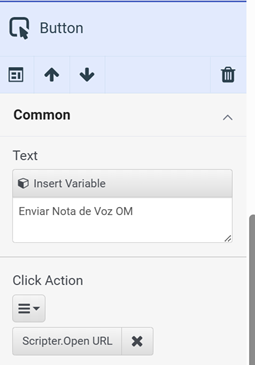
- Configure the button
Assign a label to the button (e.g., "Send voice note").
Set the type to: Actions.
Select the action: Scripter.Open.Url.
- Configure
Scripter.Open.Url
Paste the previously indicated URL.
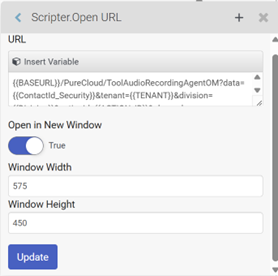
Make sure all the variables used are defined as INPUT variables in the Script.
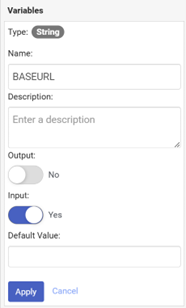
Required variables in the Script:
BASEURLContactId_SecurityTENANTDivisionACTION_IDChannelIdServiceProviderCriteriaCriteriaValueContactId
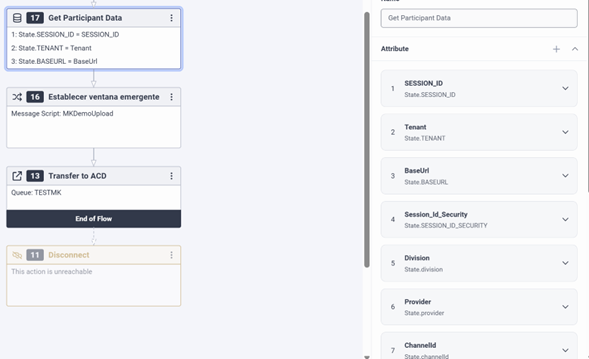
- Retrieve variables in the Genesys Flow (Architect)
In the Inbound Message Flow in Architect, the following variables sent from Lynn must be retrieved as attributes:
BASEURLContactId_SecurityTenantDivisionActionIdChannelIdServiceProviderCriteriaCriteriaValueContactId